How we build the Familiar’s brain: the typewriter, the Pi, the old TV, the lights, the sound and the power. Every section opens with what we recommend, then the why, the wiring and the code.
What we recommend comes first
to confirmWe could not verify it yet
Safety, read before you touch
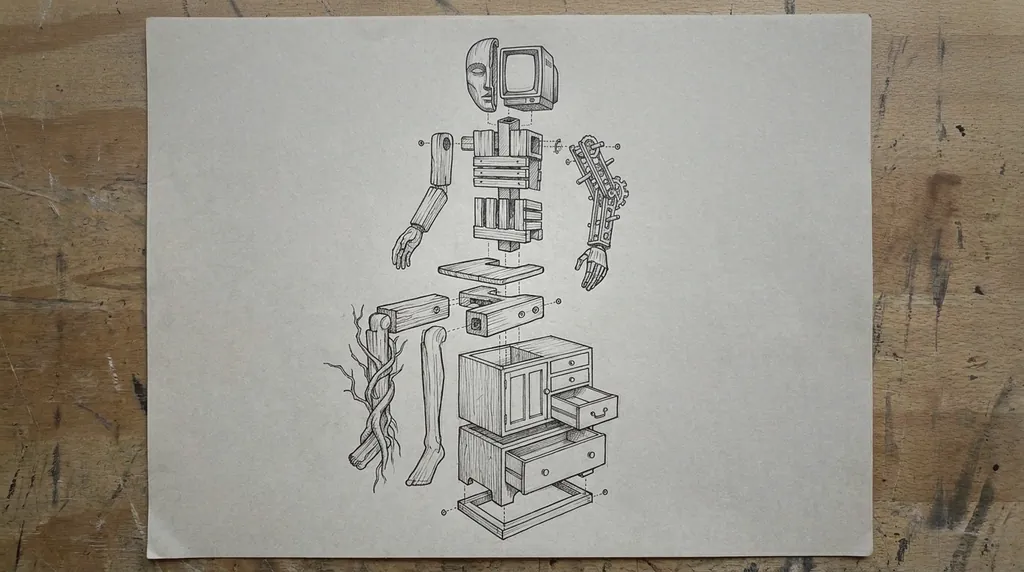
Plate 0 Concept sketch. The head is a 20 inch TV shell; the brain lives behind its glass.
A spell starts as a finger on a 1940s key and ends as light on curved glass. In between sit one sensor board, one Raspberry Pi and one small light node. This is the whole path.
What we recommend
Keep one brain. The Pi runs the same show software you are using on this site, in Chromium kiosk mode, plus a small Python bridge for the sensors and the light node. Everything else is a peripheral that can fail without taking the Familiar down.
Fig. 01.1 The Familiar, end to end. Green wires carry live signals, amber ones light, coral marks the power safety chain. Press any key: a signal runs the path.
01.1The prototype is the show software
The console on this site and the face in the Familiar’s head are the same code. core/spells.js decides what a line means, core/cues.js times what happens, tv/crt.js draws the face. On the Pi, Chromium opens /output/ from its own SD card, with no network at all. Change a spell here, copy the folder to the Pi, and that is what the Familiar does. There is no second version to keep in sync.
What runs where, on the bench and inside the Familiar
Layer
On the bench (this site)
Inside the Familiar
Keys
Your keyboard or a USB typewriter
The typewriter’s RP2040 sensor board, a plain USB keyboard
Spell engine
Same file: core/spells.js, core/cues.js
Face
Canvas in this tab
The same canvas on the 19 inch panel (HDMI) or a tube (composite)
Lights, latches, printer
The structure simulator
The ESP32 light node, through familiar_bridge.py
Sound
Web Audio in this tab
Web Audio on the Pi, into a USB sound card and amplifier
Sensors
Buttons on the console
Reed switches and the distance sensor on the Pi’s GPIO
01.2Keystroke to glass in under 50 ms
A typewriter answers instantly: the slug hits the platen the moment you commit. If the glass lags more than a few frames, the Familiar feels like a computer pretending. Our ceiling is 50 ms from the key’s trigger point to the first lit letter. Here is where the time goes on the panel build.
Total43 msunder ceiling
025 ms50 ms ceiling75 ms
How we measure it. Film the key and the glass together with a phone at 240 frames per second; every frame is 4.2 ms. Count frames from the moment the typebar passes its trigger point to the first lit letter. Do it 20 times, keep the median and the worst. The two big levers we control: polling the sensors and USB at 1 ms, and picking a panel with a low-lag or game mode. A real tube removes the panel’s share entirely.
01.3What happens on a cast
1
The carriage return lever closes a switch. The sensor board sends Enter, like any keyboard.
2
input.js turns the line into a line:cast event with its timing: characters, milliseconds, the gaps between keys, words per minute.
3
spells.js reads the line (letters and spaces only) and answers with a wish, a near miss or a spell.
4
cues.js plays the spell’s cues at their millisecond offsets: tv.* to the face, sound.* to the speakers, lights.*, drawer.*, door.* to both the simulator and the bridge.
5
The bridge sends one JSON line per cue to the light node. The node runs each light scene by itself, so a lost message never leaves a drawer stuck on.
02The mouth
The typewriter, made digital.
The typewriter has to feel exactly like a 1940s machine, with the weight, the clack and the bell, and every keystroke has to arrive as one clean digital key. There are five ways to get there.
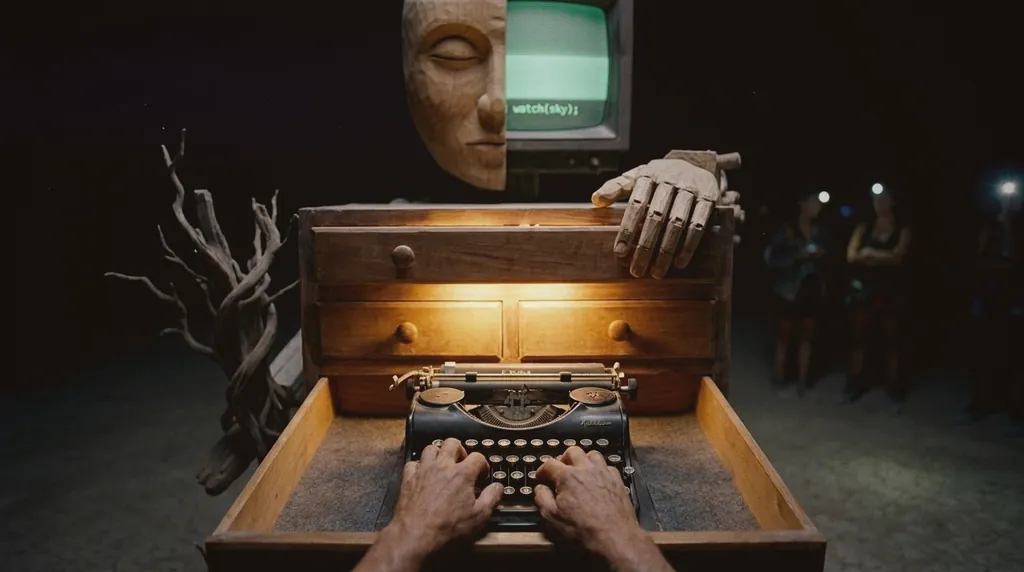
Plate 2 Concept render of the typewriter drawer. Everything you see stays mechanical; the electronics hide under the key levers.
What we recommend
Hall sensors and tiny magnets under the key levers, read by an RP2040 board that shows up as a plain USB keyboard. This is the proposal’s plan: nothing touches, nothing wears, and the Pi needs no driver. Keep a contact strip kit as plan B, and hide a small USB keyboard in the drawer as the emergency fallback.
Five ways to make the typewriter digital, compared
Approach
How it senses
Feel
On playa
Effort
Verdict
Hall sensors + magnets into an RP2040 USB keyboard
A magnet on each key lever moves over an analog Hall sensor; the firmware turns each reading into a key press
Untouched
No contacts to foul; the board can be sealed
Medium to high: about 45 sensors, one calibration pass
Our pick
Contact strip kit (USB Typewriter style)
Each lever closes an electrical contact as it strikes to confirm
Nearly untouched
Open contacts collect playa dust
Low: a kit and an afternoon
Plan B
Optical sensors
Each lever breaks or reflects an infrared beam
Untouched
Dust blinds optics; sunlight leaks in
Medium
Not for playa
Hidden mechanical keyboard
A modern keyboard hidden in the drawer
Not the typewriter
Sturdy and cheap to swap
None
Emergency only
Electronic typewriter hack
Scan the key matrix of a 1980s electronic typewriter
Wrong era, quiet keys
Fine
Medium
Fast prototype only
Fig. 02.1 Side view of one key. The magnet rides under the key lever; the sensor sits on a strip below and never touches it. We set the trigger at about 60 percent of travel, just before the typebar commits. The gap and trigger point come from the calibration pass, not from a drawing to confirm on our machine.Fig. 02.2 The sensing chain. Three 16 channel multiplexers give 48 inputs for one RP2040 analog pin each; the return lever and shift get their own pins.
02.1The return lever is the cast
Throwing the carriage return lever is the most theatrical move on the machine, so it is our cast. On a manual typewriter that lever also advances the paper a line. We put a sealed microswitch (or a Hall sensor and a magnet) where the lever meets its stop, so only a full throw counts, and the firmware sends Enter. A return is slow, so it gets a 150 ms lockout instead of the 30 ms the keys use.
The bell. The margin bell rings a few characters before the end of the line to confirm the count on our machine. It is the best sound effect we own, so we leave it alone. If we want the software to know, a Hall sensor on the bell hammer can send an extra signal; input.js already caps a line at 64 characters.
Shift. On most machines of the era, Shift lifts the whole type basket or segment. One Hall sensor on the basket tells the firmware to hold the USB Shift modifier. The Familiar reads letters without case, so shift only matters for punctuation.
02.2Paper and ribbon
“Nothing is stored” is a promise, and paper keeps words. Our lean: no paper. Set the ribbon selector to its stencil position if the machine has one, so the slugs strike without ink, and wrap the platen in a sheet that takes the hits to confirm both on our machine. Typing without any paper can wear a hardened platen. The other options, and the decision, are in section 08.
02.3Debounce and chatter
Metal contacts bounce for a few milliseconds, which reads as two or three presses. Hall sensors do not bounce, but a typebar can rebound off the platen and a heavy finger can double tap. The firmware handles both:
Hysteresis. Press at 60 percent of the calibrated travel, release below 35 percent.
Lockout. After a press, the same key is ignored for 30 ms.
Two at once. Fast typists strike two keys nearly together; on a manual the typebars can jam at the guide. The board reports both keys in the order their fields crossed.
The key tester below flags any repeat of the same key inside 35 ms as a double strike, so you can tune these numbers on the real machine.
02.4Key tester
Plug in any keyboard or a converted typewriter, click the panel and type. You will see each key with its timing, the gap since the last key, double strikes, a cadence trace and the line the Familiar would read. Return casts the line. Nothing leaves this tab and nothing is saved.
Click the panel, then type
Keys
0
Last gap
·
Mean gap
·
Words per minute
·
Double strikes
0
Cadence, last 10 s gap between keys double strike, under 35 ms
On the platen
What the Familiar reads
Press Return to cast the line.
Last keystrokes with timing
#
Key
Code
At
Gap
Held
Flags
No keys yet. Click the panel above and type.
03The brain
One Pi, no internet.
A Raspberry Pi 5 in the head runs everything: a tiny local web server, the show page in Chromium, and familiar_bridge.py for the sensors and the light node. No accounts, no updates on playa, no network.
What we recommend
Raspberry Pi OS with desktop. Chromium in kiosk mode loads http://localhost:8080/output/. A read-only overlay file system means pulling the power can’t corrupt the card. Systemd restarts anything that dies, and we update spells by swapping a USB stick.
Fig. 03.1 What runs on the Pi. Everything listens on 127.0.0.1 only; nothing is reachable from outside the head.
03.1Install, once, at home
1
Flash Raspberry Pi OS (64-bit) with desktop with Raspberry Pi Imager. The current release is based on Debian Trixie. Set the hostname familiar and a user, and leave Wi-Fi blank.
2
On a wired connection at home, update once and install the bridge’s three libraries from apt (no pip needed):
sudo apt update && sudo apt full-upgrade -y
sudo apt install -y python3-websockets python3-serial python3-gpiozero python3-lgpio
# the show itself: this whole site folder, copied onto the card
sudo mkdir -p /opt/familiar && sudo cp -r ~/spellworks /opt/familiar/site
sudo cp -r /opt/familiar/site/pi /opt/familiar/pi
3
Install the two services and the kiosk autostart from pi/setup.md, then reboot. The face should come up on its own in under a minute.
03.2Serve /output/ locally
Chromium refuses to load ES modules from file:// pages, so the show needs a web server even with no network. Python’s built-in one is plenty for one browser on the same board. It binds to 127.0.0.1, so nothing outside the Pi can see it. As a bonus, http://localhost counts as a secure context, so Web Serial works on the Pi too if we ever want it.
# /etc/systemd/system/familiar-site.service
[Unit]
Description=The Familiar: local web server for the show
After=local-fs.target

[Service]
ExecStart=/opt/familiar/pi/serve-site.sh
Restart=always
RestartSec=2
User=familiar

[Install]
WantedBy=multi-user.target
03.3Kiosk autostart
Raspberry Pi OS runs the labwc Wayland compositor on every model; Bookworm images from before late 2024 used wayfire. We log in automatically, turn screen blanking off and start Chromium full screen. The loop restarts Chromium if it ever crashes, and the autoplay flag lets the music box play without anyone clicking first. Wayland has no global way to hide the pointer, so the show page hides it itself.
# ~/.config/labwc/autostart  (runs on top of the system autostart)
/opt/familiar/pi/kiosk.sh &
# wayfire instead of labwc: add to ~/.config/wayfire.ini
[autostart]
kiosk = /opt/familiar/pi/kiosk.sh
# desktop autologin and no screen blanking (run with sudo from the kiosk user)
sudo raspi-config nonint do_boot_behaviour B4
sudo raspi-config nonint do_blanking 1      # 1 = blanking off
03.4The bridge: familiar_bridge.py
About 300 lines of Python, one job: be the Familiar’s nervous system. It runs a WebSocket server on ws://127.0.0.1:8765 for the show page, keeps a serial line open to the light node at 115200 baud, and watches the GPIO.
Page to node: every JSON line from the page goes to the node unchanged.
Node to page: every line from the node goes to every connected page.
Drawers: one reed switch per drawer on a GPIO pin with a pull-up; opening a drawer sends {"evt":"drawer","id":"ember","open":true}.
Presence: the distance sensor sends {"evt":"presence","near":true,"cm":140} with hysteresis, so someone swaying at the edge doesn’t flicker it.
Privacy: it never logs what is typed, only counts.
On playa the power will be cut mid-write at some point. With the overlay file system on, every write goes to RAM and the card stays exactly as we flashed it; a reboot is always a clean boot. Turn it on last, after everything works. Turn it off, reboot, change things, turn it on again, reboot.
Two watchdogs: systemd pets the Pi’s hardware watchdog, so a frozen kernel reboots itself, and the bridge pings systemd every 10 s, so a hung bridge restarts within 30 s.
# read-only overlay (raspi-config > Performance Options > Overlay File System)
sudo raspi-config nonint do_overlayfs 0 # 0 = on, and /boot/firmware read-only; 1 = off. Reboot.# hardware watchdog, /etc/systemd/system.conf (the Pi's limit is about 16 s)
[Manager]
RuntimeWatchdogSec=15s
03.6Offline policy
No radios. Wi-Fi and Bluetooth off in config.txt with dtoverlay=disable-wifi and dtoverlay=disable-bt.
No cameras, no microphones. None attached, none in the parts list, none in the code.
Nothing listens outside. The site server and the bridge bind to 127.0.0.1 only.
Nothing typed is kept. The page keeps a line only until it dissolves; the bridge logs counts, never characters; journald runs in RAM (Storage=volatile).
No updates on playa. We update at home, test, then lock the card read-only.
03.7Updating spells from a USB stick
Edit spells on the Spellbook page, then copy this whole site folder onto a FAT32 stick labelled FAMILIAR, as a folder called spellworks. At boot, serve-site.sh serves the stick if it finds spellworks/output/index.html on it, and the card’s copy if not. Plug the stick into the head, cycle the power, done. To roll back, pull the stick and cycle again. The card never changes, so a bad stick can’t break the Familiar.
04The face
The old TV, three ways.
The face is the right half of the head: a gutted 20 inch, 1970s wood-grain TV. There are three honest ways to put a picture behind its glass.
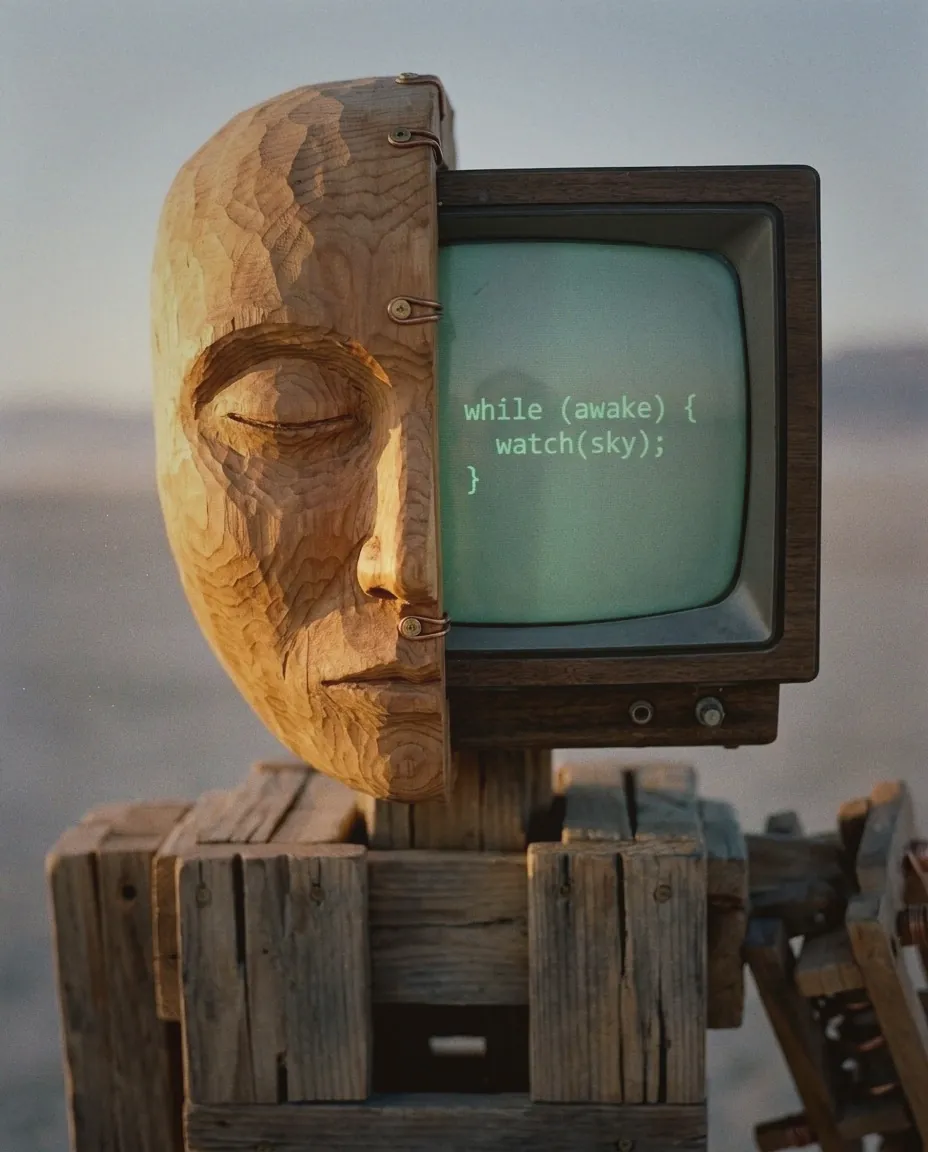
Plate 4 The look we are after: soft phosphor green behind curved glass, readable in daylight.
What we recommend
Option A, the proposal’s plan: a 19 inch LCD panel behind the original curved glass, fed over HDMI, with our software CRT look on top. It reads in daylight, it is light and cool, and it is safe. A real tube (option C) stays a stretch goal for a night-only look, and only if a builder with CRT experience owns it.
Fig. 04.1 One signal chain per option. Option B and C need composite video, which the Pi 4 has on its AV jack and the Pi 5 only on solder pads.
Tradeoffs between the three TV options
A · Panel behind the glass
B · Keep the real tube
C · Tube transplant
Look
Convincing at arm’s length; the curved glass sells it
The real thing: scanlines, bloom, glow
Real CRT; green phosphor looks magic
Daylight
Good
Washes out
Weak; needs a hood
Power
About 15 to 25 W to confirm
Highest; a 1970s colour set runs hot to confirm
Moderate to confirm
Weight
Light
Heaviest; glass and chassis
Medium
Fragility
Panel needs padding for the drive
Old tube, 50-year-old capacitors
Tube in a shell; better than B
Safety
Low voltage only
Lethal voltage inside the set
Lethal voltage inside the monitor
Effort
Low
High: restore a 1970s chassis
Medium
04.1Option A, panel behind the glass
A 20 inch tube is 4:3, so look for a 19 inch monitor with a 4:3 or 5:4 shape (1280 by 1024 is common), an IPS panel for wide viewing angles, and a low-lag mode. Strip the stand and plastic bezel, mount it behind the original glass on a black-painted mask cut to the tube’s rounded opening, and leave an air gap for heat. Some monitors run from an external 12 V brick, which lets us skip the inverter to confirm per model. The software CRT look (curvature, scanlines, bloom) comes from tv/crt.js; the glass does the rest.
04.2Option B, keep the real tube
A 1970s set almost never has a video input; it has screw terminals for an antenna. So we make a tiny TV station: the Pi’s composite video goes into an RF modulator set to channel 3 or 4, the modulator’s 75 ohm coax goes into a 75 to 300 ohm matching transformer (a balun), and the balun’s two spade lugs go onto the VHF screw terminals. Tune the set to the same channel. The set itself needs a full restoration by someone who knows tube chassis.
On a Pi 4 the composite signal shares the 3.5 mm jack with audio. The usual pinout is tip left, ring 1 right, ring 2 ground, sleeve video, but cables differ: camcorder cables often put video on the red plug to confirm with a meter.
Pi 4 · 3.5 mm AV jack
# /boot/firmware/config.txt
dtoverlay=vc4-kms-v3d,composite
enable_tvout=1
# composite turns HDMI off on a Pi 4:# boot with HDMI unplugged
Pi 5 · J7 "VID" pads
# /boot/firmware/config.txt
dtoverlay=vc4-kms-v3d,composite
enable_tvout=1
# HDMI keeps working on a Pi 5. Find the# ground pad with a meter, solder a header
Or let raspi-config write both lines: sudo raspi-config nonint do_composite 0, then reboot. NTSC is the default standard, so 480i needs nothing more. Which J7 pad is ground is not documented to confirm with a meter. Details per model, with sources, in pi/setup.md.
04.3Option C, tube transplant
Keep the 1970s cabinet and glass as a shell, and mount a later CRT that already takes composite video behind the original bezel: a small 1980s to 2000s TV with an RCA video input, a computer monitor that took composite, or a green-phosphor monitor for the purest glow. Match the tube size to the opening first; a smaller tube behind a black mask reads fine. The Pi’s composite goes straight in, no modulator.
04.4Designing for a 480-line tube
Our face is drawn on a 640 by 480 canvas, which is exactly what a composite tube can show. A few rules keep it readable:
Two pixel minimum for horizontal lines. On an interlaced picture a one pixel line lives in one field and flickers.
Stay inside title safe, the middle 80 percent. Old sets overscan and hide the edges.
Big type. Courier at 24 px or more, six to eight words a line.
Avoid saturated red. It smears on composite. Phosphor green on black is the best case.
Test signal, 640 by 480
Bars check colour and level. On a real tube, the white bar should not bloom.
For option A, a dead set is perfect. We only need the cabinet, the glass and the knobs. Ask for non-working sets at thrift shops, reuse yards and estate cleanouts.
Measure the tube diagonally across the glass, and check the depth: our head is shallow.
Check the wood. Real veneer can be repaired; printed vinyl over particle board can’t.
Knobs and badges are the face’s jewellery. Make sure they are all there.
For option B, it must power on with a picture, and you should see it work in person before taking it home.
High voltage. Read this before you open any CRT set
A picture tube works at many thousands of volts and can hold a lethal charge for days or weeks after it is unplugged. Never open a CRT set unless a builder trained in CRT work is there. The tube must be discharged by that person before anyone reaches inside. Never lift a tube by its neck, wear safety glasses, and keep one hand in your pocket around a live chassis. A tube we remove goes to an e-waste site: the glass contains lead.
05The body
Lights, sound and surprises.
One small ESP32 light node owns every LED, latch and printer. The Pi tells it which scene to run and the node runs it on its own, so the Familiar keeps glowing even if the Pi hiccups.
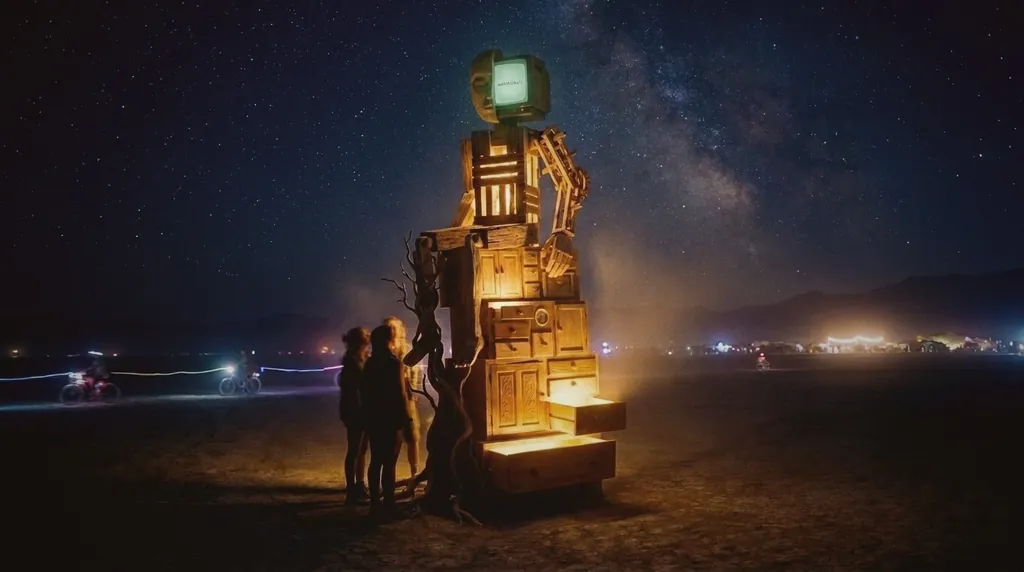
Plate 5 Night, as rendered. Every warm glow here is a zone the node controls.
What we recommend
One ESP32 node and 12 V everywhere: WS2815 pixels for the figure, crown and roots; warm 2700 K, high-CRI strips on PWM channels inside the dioramas; a level shifter on every pixel data line and a fuse on every branch.
Fig. 05.1 The light node. Every amber wire is light; coral marks the fuses.
05.1Zone map
Zones are the same names the spells use (lights.scene {zone, scene}), so a spell written on this site lands on the same wood and glass. Drawer positions below are not final.
The figure
crownpixels · run 2
tvscreen brightness, plus a halo behind the set · run 2
heartpixels · run 1
figurepixels · run 1
rootspixels · run 3
groundpixels · run 3
cabinetedge pixels on the carcass · run 3
The cabinet
emberPWM 0
loomPWM 1
wirePWM 2
staticPWM 3
typewriterPWM 7 · the mouth
garagePWM 4
feedPWM 5
grovePWM 6
mirrorPWM 8
doorPWM 9 · do not open
Fig. 05.2 Zones and the hardware behind them. all means every zone. Drawers and the door are single 2700 K dimmers, so they take a level but ignore colour.
05.2LEDs, the careful way
LED choices by zone
Where
What
Why
Dioramas (9)
12 V, 2700 K, 90+ CRI static white strip on a logic-level MOSFET, PWM at about 1 kHz or more to confirm
Warm, true colour on the tiny sets; one dimmer channel per drawer
Figure, crown, roots, ground
WS2815 addressable pixels, 12 V
Lower current than 5 V pixels on long runs, and a backup data line: one dead pixel doesn’t black out the rest
Close-up warm accents
SK6812 RGBW, warm white variant, 5 V from a local converter
A real warm white chip instead of mixing red, green and blue
Level shift every data line. The ESP32 speaks 3.3 V; pixels want 5 V logic. A 74AHCT125 buffer fixes it, with a small resistor (about 330 ohm) in series at the strip.
Inject power at both ends of long runs and every few meters, and put a large capacitor (about 1,000 µF) across power where each run starts.
Fuse every run at the supply end, sized to the wire, not the LEDs.
Cap the current in firmware. FastLED’s power limiter keeps the awaken scene from pulling the bus down.
05.3The wire protocol
Newline-delimited JSON, one message per line. Serial at 115200 baud, or WebSocket text frames to the Pi bridge at ws://localhost:8765. In a light scene, ms is the time to cross-fade into it (for sweep-up, the length of the sweep), period sets the rhythm of breathe, chase and pulse, and bpm sets the heartbeat. The node ignores fields it doesn’t know, answers ping with pong, and falls back to its own idle glow after 30 s without hearing from the Pi.
Fig. 05.3 The audio chain. The Pi 5 has no headphone jack, so sound leaves by USB or an I2S board.
A class-compliant USB sound card needs no driver; an I2S DAC board on the GPIO header (Raspberry Pi DAC+ or DAC Pro) is the tidier, quieter option. Either feeds a small class D amplifier running straight off the 12 V or 24 V bus, into two weather-resistant speakers aimed out of the cabinet plinth. We cap loudness twice: a maximum gain in audio.js, and the amp’s gain set once with a sound meter on site. The Familiar should be heard by the people at the drawers, not by the next camp. Burning Man’s current guidance for sound at art installations is to confirm before we pick speakers.
05.5Surprise hardware
Do not open
Solenoid door latch
A 12 V lock-style solenoid holds the tiny door. door.unlock {ms} energises it, clamped to 8 s in the bridge and again in the firmware, then a cooldown three times as long, so the coil never cooks. A flyback diode across the coil, a logic-level MOSFET, and a hidden mechanical release inside for us.
Drawer pop
Push-to-open latch
A spring touch latch holds the drawer; a small pull solenoid nudges it for 300 ms and the spring opens the drawer a few centimetres. The reed switch then reports the drawer open, the same as a hand would.
The Familiar writes back
Thermal printer
A 58 mm thermal receipt printer on the node’s second serial port prints short authored lines, never a participant’s words. It needs its own 5 to 9 V supply with a couple of amps of headroom to confirm the model. Thermal paper darkens in heat, so the roll lives in the shade.
Optional
Fog
A small fogger on a relay, pulsed by fog.puff {ms} for at most 3 s. Only if the crew wants it and Burning Man’s rules allow it on our site to confirm.
05.6Bridge tester
Talk to a real light node from this page, or to the simulator. Pick a transport, connect, send test cues and watch the lines go out and come back. The log lives in memory and is gone when you leave.
Not connected.
Send a light scene
Quick cues
Pretend to be the node
Wire0 out · 0 in
Lines appear here as they cross the wire.
06Out there
Playa-proofing and safety.
Black Rock City brings fine alkaline dust, hot days, cold nights, wind, and a long truck ride first. We plan for all of it, and for the night something fails.
What we recommend
Everything on DC straight from the battery, with no inverter. A main disconnect and a red kill switch on the cabinet’s back panel, a fuse on every branch, sealed boxes with filtered vents, and a service kit with a cloned card for every board.
Fig. 06.1 Power. Coral is the safety chain: main fuse, disconnect, kill switch, branch fuses.
06.1Power table
Our estimates per subsystem, at night. Measure each one with a USB or DC meter as it lands on the bench and replace these numbers to confirm.
Estimated power per subsystem, idle and peak, in watts
Subsystem
Idle W
Peak W
Notes
36hours on battery alone
4,000 Wh usable ÷ 110 W = 36 h, about three nights with no sun at all.
The daily balance. A 12 hour night at 110 W is 1.3 kWh. 600 W of panels on a clear playa day should bring back more than that, but dust on the panels and storms cut it, so we wipe panels every morning and treat the battery as two to three nights of insurance to confirm sun hours for late August.
06.2Dust, heat, wind
Dust
Playa dust is fine as flour and alkaline. Electronics live in gasketed boxes with filter foam over any vent. Connectors face down, unused ports get caps, the typewriter’s sensor strip gets a conformal coat. A soft brush and a hand blower, never a damp rag, inside a box.
Heat
A closed box in the sun gets far hotter than the air. Boxes go inside the cabinet, in shade, painted light. The Pi 5 is rated for 0 to 70 °C around it; its cores slow down from 80 °C and hard at 85 °C. It gets the Active Cooler, and we log its temperature through the soak test.
Wind and vibration
Every board on standoffs, every connector strain-relieved and zip-tied, no hot glue as structure. The panel rides in foam for the drive. After the drive, before power: a visual check of every plug.
06.3Kill switch, fusing, cables
Main fuse right at the battery’s positive terminal, sized to the main cable.
Disconnect switch next to it, for servicing.
Red kill switch, latching, labelled, on the back panel where a ranger can find it. It drops every load at once.
Fuse block with one blade fuse per branch: Pi, panel, node, each pixel run, dioramas, amp, latches.
Cables labelled at both ends, colour-coded (red and black for power, one colour for data), run in split loom, nothing on the ground where people stand.
06.4When something fails
Graceful degradation: what keeps working when a part fails
If this fails
The Familiar still
Fix on site
The Pi or Chromium
Glows: the node drops to its idle scene after 30 s of silence
Systemd restarts it; else swap the cloned card
The light node
Shows words on the face; lights go dark
Swap the spare node (flashed, labelled)
The typewriter sensors
Breathes and changes channel with the drawers
Plug in the hidden USB keyboard
A pixel
Lights the rest of the run (WS2815 backup data line)
Cut and splice a spare section in daylight
The distance sensor
Stays awake all night instead of sleeping
Fine; replace in the morning
Low battery
Sheds fog, printer and pixels first; keeps the face and dioramas dim
Wipe the panels, wait for sun
06.5Service kit and daily checklist
Service kit
Spare Pi 5 with a cloned card, labelled
Two more cloned cards in a sealed bag
Spare ESP32 node and RP2040 board, flashed
Spare 5 V converter and a box of blade fuses
Hidden USB keyboard (already in the drawer)
Spare reed switches, magnets, a pixel section
Thermal paper and a typewriter ribbon
Multimeter, butane soldering iron, heat shrink
Lever connectors, zip ties, gaffer tape, split loom
Soft brush, hand blower, microfiber cloths
Every day
Checkboxes are for today only; nothing is saved.
07Proof
The test plan, in order.
We ship when the Familiar passes these on the bench, in the shop and in the sun. Each milestone has one test that says it is done.
0
Bench in a browser
This site. Spells, face, sound and lights all simulated.
1
Thrift TV, Pi, keyboard
The face boots by itself behind real glass.
2
Typewriter
Every key and the return lever, under 50 ms.
3
Light node, one drawer
A spell lights a real diorama.
4
Sound
The song plays at a measured level.
5
Enclosure, power
Runs from the battery behind the kill switch.
6
Soak
72 hours, no hands.
7
Playa
The daily checklist, every day.
Acceptance tests
Test
Passes when
How we measure
Keystroke to glass
Median under 50 ms, worst under 70 ms, over 20 presses
Phone video at 240 frames per second; count frames
72 hour soak
No crash, no stuck light, Chromium memory flat after the first hour
A cast every 30 s from a test script; hourly free -m and temperature in a RAM log
1,000 casts
1,000 casts in a row, every spell included, no crash and no reboot
The RP2040 board’s test mode types lines and throws the return
Dust
Every key, reed and sensor still works; no dust inside sealed boxes
8 hours in a dust box with a fan, then open and inspect
Heat
Pi under 80 °C, no throttling flags
6 hours in a closed box in full sun; vcgencmd get_throttled reads 0x0
Power cut recovery
Back to the face in under 60 s, 25 times out of 25
Pull the power at random moments, including mid-spell
Drawers and presence
100 opens per drawer all seen; wakes at about 1.5 m
Count events in the bridge tester
Latches
200 unlocks, coil only warm to the touch
Unlock every 30 s at the maximum on-time
Lights at full
Bus stays within 0.5 V at the far end of every run during awaken
Meter at the last pixel while the scene runs
08Decisions
Open questions, and who decides.
The things we have not settled. Each one has a lean, not an answer, and needs an owner.
Paper in the typewriter, or not?
No paper, ribbon on stencil, platen protected. Or a roll we collect and recycle every morning.
Our lean No paper. It keeps “nothing is stored” true.
Decide before phase 2Owner: open
Real tube or panel?
A: panel behind the glass. B: restore the real tube. C: a later CRT behind the bezel.
Our lean A now, C as a night-only stretch.
Decide at the end of phase 1Owner: open
Moving surprises, when the proposal says “nothing motorized”?
The door latch, drawer pop and fog all move something. Solenoids are not motors, but they are moving parts on a piece we promised was fixed.
Our lean Build the door latch if the crew agrees; drawer pop and fog stay optional.
Decide before phase 3Owner: open
How loud?
Intimate (you lean in) or a moment that carries across the playa when someone casts AWAKEN.
Our lean Intimate, with a hard cap in software and a meter on site.
Decide before phase 4Owner: open
What does the printer print?
Authored lines only, or echo the wish back.
Our lean Authored lines only; a wish is never written down.
Decide in phase 3Owner: open
Who owns each subsystem?
Typewriter, brain, face, lights, sound, power, enclosure. One name each, one backup each.